

The front door used to have a relatively simple job. It separated the inside of a home from the outside and provided a physical point that could be secured with a traditional key. In 2026, that role is becoming much broader. Modern entry systems can combine identity verification, digital access, remote management, video, notifications, and integration with other connected devices. A smart door lock can therefore become more than a replacement for a traditional lock. It can serve as one of the points where several parts of a home’s security system come together.
This change is happening because homeowners increasingly expect connected devices to understand context rather than perform only one isolated function. A lock that recognizes an authorized fingerprint answers one question: who is allowed to enter? A camera can answer another: what is happening outside the entrance? A smartphone application can provide another layer by allowing the homeowner to manage or review activity remotely. When these capabilities are connected, the front door becomes an important part of a broader security architecture rather than simply a physical barrier.
Anker Canada’s current eufy security range illustrates this shift. Its smart-lock collection includes different approaches to fingerprint access, keypad entry, smartphone control, automatic locking, remote management, and video-based entry, while its outdoor camera collection includes systems designed for monitoring exterior areas around the property. The specific capabilities vary between products, but the direction is clear: access control and environmental awareness are increasingly being brought into the same connected ecosystem.
The Front Door Is Becoming an Identity Checkpoint
Traditional locks primarily answer whether someone has a key. Modern smart locks can approach the same question through digital identity. Fingerprints, passcodes, smartphones, and other access methods allow the system to determine whether the person attempting to enter has an authorized credential.
This creates an important distinction between possession and identity. A physical key generally proves that someone has the key, but a biometric access method can be tied to a specific enrolled user. Anker’s eufy smart-lock collection includes products with fingerprint recognition and keypad access, while some models also support smartphone and voice-based control.
That does not mean biometric access is automatically suitable for every household. Homeowners still need to consider backup entry methods, battery status, connectivity, and how additional users will be enrolled or removed. The important development is that the entrance can now recognize different forms of authorized access instead of relying exclusively on a physical object.
Why Video Changes the Meaning of Front-Door Access
Knowing that a door was opened is useful, but knowing what happened immediately before and around that event can provide much more context. This is one reason video-enabled locks are becoming an interesting category within connected home security.
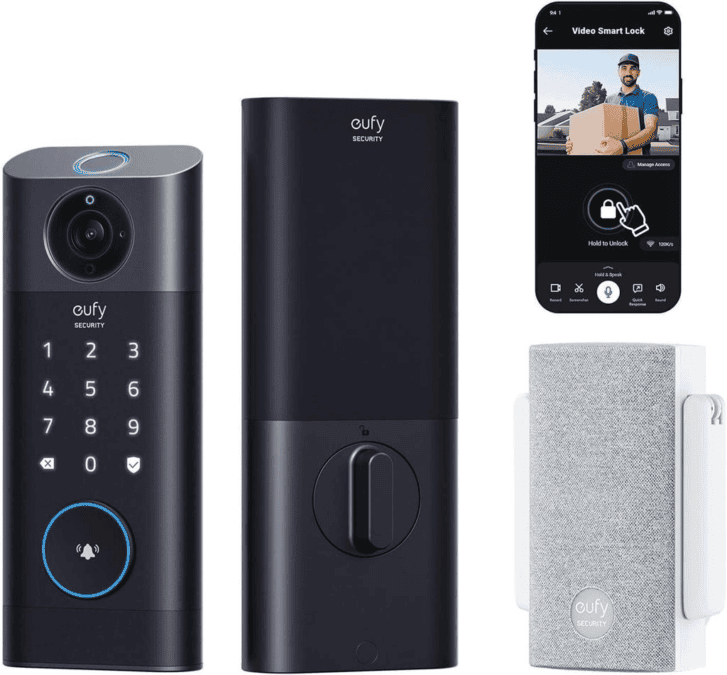
A video smart lock can combine the physical locking mechanism with a camera positioned at one of the most important locations on the property. Instead of treating access control and visual monitoring as completely separate systems, the two functions can operate around the same entrance.
Anker’s eufy collection includes video smart locks with features such as 2K camera capabilities and doorbell functionality on certain models. The exact combination differs between products, but the underlying concept is significant: the front door can become both an access point and a source of visual information.
Exterior Monitoring Extends the Security Picture
Even an advanced lock has a limited field of awareness. It controls the door, but activity can begin much farther away. Someone may approach from the driveway, walk toward the porch, wait near a side entrance, or move through another part of the property without ever touching the front door.
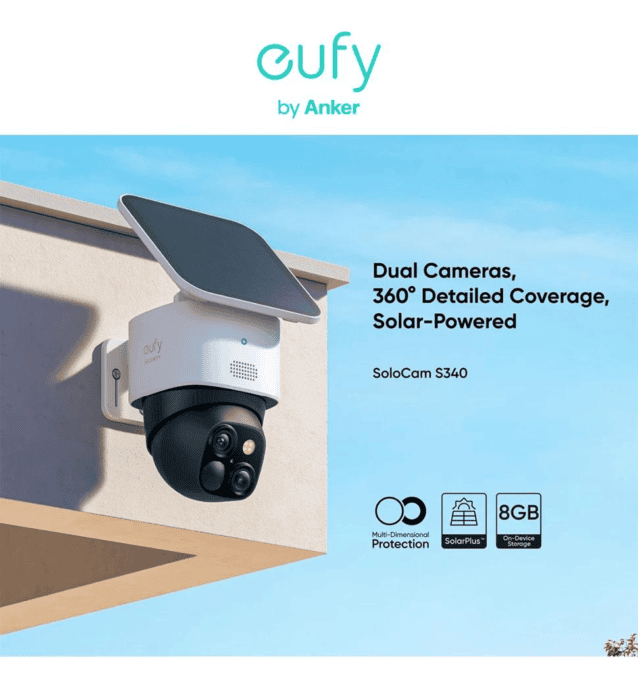
This is where outdoor security cameras become an important complementary layer. Anker Canada’s outdoor camera collection includes wireless eufy models such as SoloCam S340, eufyCam S4, S3 Pro, and other configurations designed for different exterior monitoring needs.
The distinction between the two technologies is useful. The lock is primarily concerned with controlled entry, while the camera provides visibility around the property. Together, they can cover two different stages of the same event: what happens outside the entrance and what happens when someone attempts to gain access.
AI Detection Is Changing What a Security System Notices
One of the more significant developments in connected security is the movement from recording everything toward identifying specific types of activity. Modern cameras increasingly use AI-based detection to distinguish between categories such as people, vehicles, pets, and other movement, depending on the model.
Anker’s eufy security ecosystem highlights AI-powered detection features across its camera products, with certain systems designed to provide more targeted notifications instead of treating every movement as equally important. This distinction can matter because a camera placed outside a home may capture constant environmental movement from trees, shadows, animals, vehicles, and people.
For homeowners, the benefit is not simply having more alerts. The real objective is useful information. If a security system can distinguish between ordinary background activity and a person approaching an entrance, the resulting notification can be more meaningful. However, AI detection should still be treated as an assistive technology rather than an infallible decision-maker.
Local Processing and Privacy Are Becoming Bigger Considerations
As more security functions become connected, privacy becomes increasingly important. A smart lock can generate access information, while cameras can produce video recordings and notifications. These systems therefore handle information that homeowners may reasonably want to keep under their control.
Local storage is one approach being used across modern home-security systems. Anker’s eufy ecosystem includes products and HomeBase systems that emphasize local storage options on compatible devices. The exact storage architecture differs between products, so homeowners should check the specifications of the particular model rather than assuming every device works in the same way.
Privacy also involves camera placement. A security camera should be positioned to monitor the areas that genuinely matter to the homeowner without unnecessarily capturing neighboring private spaces. As security technology becomes more capable, responsible placement and account security become just as important as the hardware itself.
The Front Door Can Become a Connected Decision Point
The deeper change in 2026 is not necessarily the lock itself. It is what happens when the lock becomes connected to information from other devices.
Imagine a homeowner receiving a notification that someone has approached the entrance. An exterior camera may provide visual information about the event, while the lock remains secured. If the person is an expected visitor, the homeowner may have the ability to manage access remotely through a compatible system. If the event is simply a delivery, no physical interaction with the lock may be necessary at all.
This illustrates why connected security is different from simply adding more hardware. The value comes from the relationship between devices. A camera can provide context, a lock can control access, and an app can bring information and controls together. The result is a security system that can provide more information before a homeowner decides what action, if any, is necessary.
Remote Access Is Becoming a Normal Part of Home Management
The ability to control a home while away was once associated mainly with specialized smart-home setups. In 2026, remote management is becoming a more familiar feature of connected security products.
Compatible eufy smart locks can be managed through the eufy Security app, with certain models offering features related to remote access, activity information, notifications, and lock status.
This can be useful in ordinary situations. A homeowner may need to check whether the door is locked after leaving, provide access to an authorized person, or review an alert while away. Remote functionality does not eliminate the need for sensible security practices, but it can make the front door easier to manage when nobody is physically standing near it.
Automatic Locking Changes a Small but Important Habit
Many security problems are not caused by sophisticated attacks. Sometimes the issue is simply that a door was not secured properly after someone left. Automatic locking addresses this very ordinary part of household behavior.
Compatible smart-lock systems can be configured to lock automatically after a specified period or according to the product’s available settings. Anker’s eufy range includes models with automatic locking features, although the exact operation varies across products.
The significance of this feature is easy to underestimate. Security technology does not always need to solve an extraordinary problem to be useful. Removing small sources of human error can be valuable because they occur repeatedly. A system that automatically handles part of a routine can reduce the number of things homeowners need to remember every time they leave home.
One Security System Does Not Have to Mean One Device
The idea of a connected security hub can sometimes create the impression that homeowners need one enormous device that performs every function. In reality, a more practical system can consist of several specialized devices that communicate within the same ecosystem.
A smart lock can focus on entry. Exterior cameras can monitor different parts of the property. A video doorbell or camera-equipped lock can provide a closer view of the entrance. A HomeBase or compatible hub can provide another layer of connectivity and storage depending on the system.
This modular approach makes it easier to build security around the property rather than forcing every home into the same configuration. A small apartment may need very different equipment from a detached house with a driveway, backyard, garage, and multiple entrances.
The Physical Layout Still Matters More Than the Feature List
Technology cannot compensate for poor planning. A camera with advanced detection will still have limited usefulness if it is pointed at an obstructed area. A sophisticated lock may offer many access methods, but those features may not matter if the household prefers a simple keypad. A solar-powered camera may be useful in an exposed location but less practical where sunlight is heavily restricted.
Homeowners should therefore begin with the property rather than the product catalogue. Identify the main entrances, areas where people approach the home, locations where deliveries are normally left, and places that are difficult to observe from inside.
Once these areas are understood, technology can be selected to address specific gaps. This approach can also reduce unnecessary spending because every device has a defined purpose instead of being installed simply because it offers another feature.
What to Evaluate Before Building a Connected Front Door
A connected security setup should be evaluated as a complete system rather than as a collection of individual specifications.
- Access methods: Consider fingerprints, passcodes, smartphones, physical keys, and other supported options.
- Video: Determine whether the entrance needs a dedicated camera or whether a video smart lock is sufficient.
- Exterior coverage: Identify driveways, walkways, gates, and other areas that need monitoring.
- Connectivity: Check Wi-Fi requirements, app support, and compatibility with the home’s existing network.
- Storage: Understand whether footage and other security information can be stored locally, in the cloud, or through a hub.
- Power: Compare battery, wired, and solar options according to the installation location.
- Privacy: Consider camera angles, account protection, data handling, and who has access to the system.
- Backup access: Make sure there is an appropriate method of entering the home if a battery, phone, or connectivity system becomes unavailable.
These considerations become increasingly important as the front door takes on more responsibilities. More technology can provide more functionality, but it also makes understanding the complete system more important.
What 2026 Means for the Future of Home Entry
The direction of smart home security suggests that the front door will continue moving from a passive physical barrier toward an active digital checkpoint. Fingerprint recognition, video, remote control, AI-assisted detection, notifications, and integration with exterior cameras are bringing several previously separate functions closer together.
The interesting development is not that every home suddenly needs every available feature. Instead, homeowners now have more ways to design an entry system around their particular needs. Someone may prioritize biometric access, another homeowner may care more about video, while another may be interested in remote management and integration with outdoor monitoring.
This flexibility is likely to remain important as connected-home technology develops. The strongest systems will not necessarily be the ones with the longest feature lists. Their usefulness will depend on how well the individual technologies work together, how clearly they communicate important events, and how easily homeowners can manage them without turning everyday security into a complicated task.
Final Thoughts
The front door is becoming an increasingly important part of the connected home. What was once a simple combination of a door and physical key can now involve biometric identity, digital access, video, notifications, remote management, and communication with other security devices.
A smart door lock can provide the controlled-entry foundation, while outdoor security cameras can extend awareness beyond the immediate doorway. When these technologies are planned as complementary layers, the front door can become a practical security hub that connects access control with information about what is happening around the property.
The most important consideration remains the home’s actual requirements. Property layout, household routines, privacy expectations, connectivity, power availability, and preferred access methods should all influence the final setup. In 2026, smarter home security is increasingly less about simply adding another device and more about making different technologies work together in a way that is understandable and useful.
FAQs
What makes a smart door lock different from a traditional lock?
A traditional lock generally relies on a physical key, while smart locks can support additional access methods such as fingerprints, passcodes, smartphones, and other digital credentials depending on the model.
Can a smart door lock include a camera?
Yes. Some modern video smart-lock models combine locking hardware with a built-in camera and other front-door monitoring features. The exact specifications depend on the product.
Why are outdoor cameras useful alongside a smart lock?
A lock controls access through the door, while an outdoor camera can monitor areas such as a driveway, walkway, porch, or side entrance. They therefore address different parts of the same security environment.
Is biometric entry safer than using a key?
Biometric entry offers a different form of authentication because access can be linked to an enrolled fingerprint or other supported biometric credential. However, overall security also depends on the device, configuration, backup access methods, account security, and how the system is maintained.
Do smart locks require Wi-Fi?
Not every function necessarily requires Wi-Fi, and requirements vary by model. Some features, particularly remote management and certain app-based functions, may depend on Wi-Fi or another form of connectivity.
How important is local storage for home-security devices?
Storage architecture can affect privacy, accessibility, and how recordings are managed. Some systems support local storage through compatible devices or hubs, while others may offer cloud-based options. Homeowners should review the specific storage model before purchasing.
Will smart home security replace traditional security practices?
Connected devices are designed to supplement physical security and household routines, not eliminate basic precautions. Doors, windows, lighting, account security, device maintenance, and sensible privacy practices remain important parts of an overall home-security approach.